
How SE Ranking and Surfer SEO Approach SEO Differently in 2025
The way an SEO platform is designed usually says more than its feature list. In 2025, the difference between SE Ranking and Surfer SEO is less about overlapping capabilities and more about how each tool expects SEO work to be done.
SE Ranking treats SEO as an ongoing system. Rankings fluctuate, competitors adjust, and technical issues surface gradually. Its interface reflects that reality by prioritizing visibility, monitoring, and structured optimization over time.
Surfer SEO takes a more focused approach. Instead of managing SEO holistically, it concentrates on page-level execution—helping users make better decisions while creating or updating individual pieces of content.
That philosophical split shapes everything from dashboards to daily usage patterns.
Why These Two Tools Are Often Evaluated Side by Side
SE Ranking and Surfer SEO are frequently compared because content and SEO are no longer separate disciplines. Content decisions influence rankings directly, and ranking data increasingly informs content strategy.
SE Ranking includes content-related features inside a broader SEO environment, which makes it appealing to teams that want fewer tools and clearer oversight. This positioning is often discussed in deeper breakdowns like check out our Full SE Ranking Review 2025, where its role as an all-in-one platform becomes more apparent.
Surfer SEO is primarily a content optimization platform, not a full SEO suite. Most teams use it specifically for the Content Editor, then rely on another tool for tracking and audits. Read our Surfer SEO Review (2025) for the full feature breakdown.
The overlap exists—but the intent behind each product does not fully align.
SEO Expectations in 2025 Change How Tools Are Judged
Modern SEO places far less emphasis on isolated optimizations. What matters now is how well content aligns with intent, how consistently pages perform across a topic, and how quickly teams can react to changes.
SE Ranking works best when you’re tracking changes consistently and acting on them week to week. To see whether it fits your routine, Start SE Ranking Free Trial (No Credit Card).
Surfer SEO is typically used while writing or updating a page, because it’s designed to improve on-page relevance before publication. Try Surfer SEO Content Editor.
Neither approach is outdated—each simply solves a different part of the SEO equation.
What User Feedback Consistently Emphasizes
Verified reviews across platforms such as Trustpilot and G2 tend to reinforce this divide rather than blur it.
SE Ranking users frequently mention clarity, breadth, and value relative to pricing. The platform is often described as dependable for tracking progress and maintaining visibility over time, which aligns with its system-oriented design.
Surfer SEO reviews lean toward usability during content creation. Writers and editors regularly highlight how the Content Editor helps reduce uncertainty when structuring pages, particularly in competitive niches.
These patterns show up repeatedly and mirror how the tools are positioned—one as a control layer, the other as an execution layer.
📷 Image Placeholder 2
What to show: Content Editor optimization panel
Click path (inside Surfer SEO):
Content Editor → Create → Enter keyword → Content Editor dashboard
Alt text: “Surfer SEO Content Editor optimization guidelines interface”
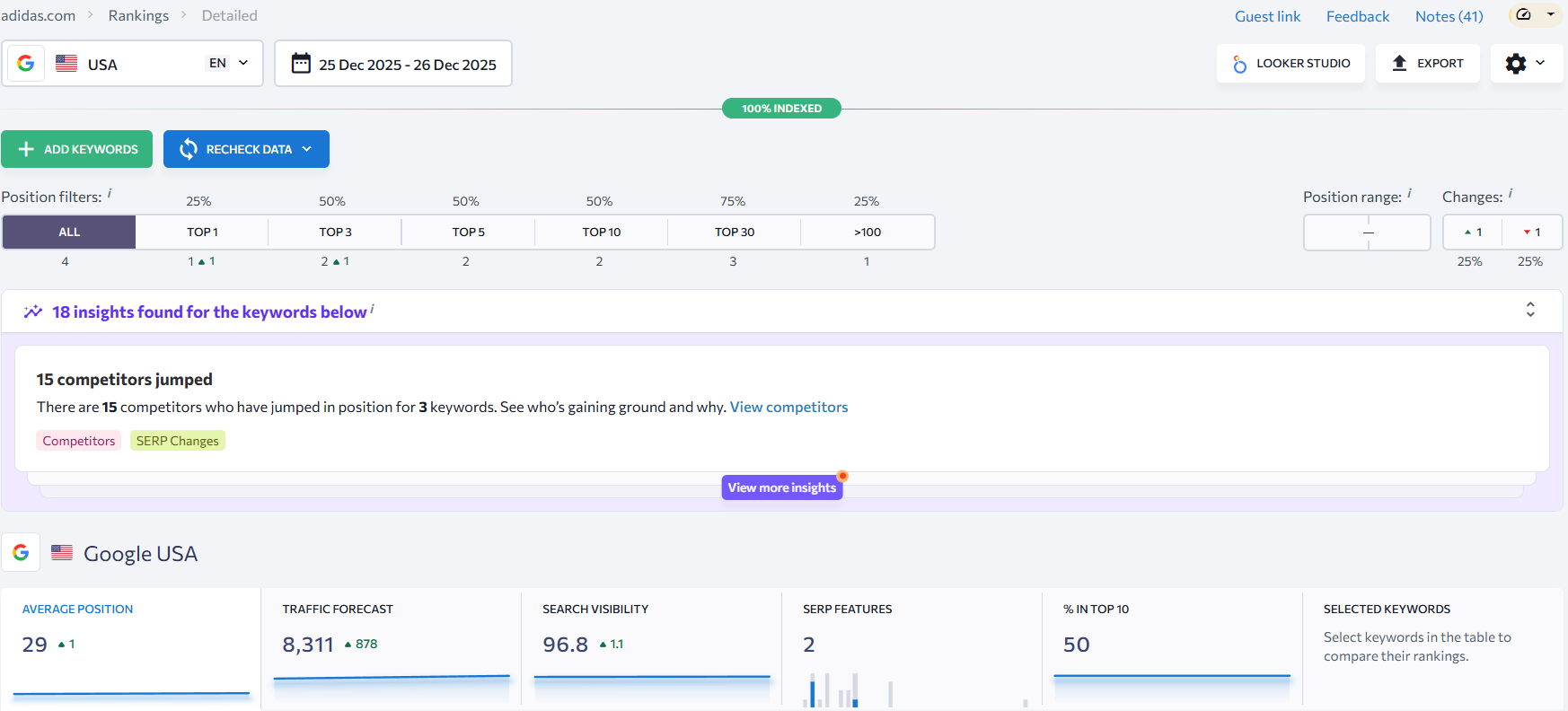
SE Ranking Keyword Rankings Overview With Trend Lines

Core Platform Focus and Workflow Design
The fastest way to understand SE Ranking versus Surfer SEO in 2025 is to look at what each product is built around.
SE Ranking leans into “SEO as a system.” It’s designed to keep you informed on what’s happening across your site: rankings, technical issues, competitors, and links—then let you act on what the data suggests. The official feature set emphasizes rank tracking and broader SEO tooling like audits and backlink analysis.
Surfer SEO leans into “SEO as content execution.” The product experience centers on the Content Editor—helping you create or update a page by comparing it with what’s ranking and giving writing/structure guidance as you work.
Those two philosophies create very different workflows.
SE Ranking’s workflow feels like a control center
With SE Ranking, the natural starting point is usually a project view where you’re watching performance and spotting issues early. Rank tracking is a headline feature, including tracking across locations and devices and visibility into SERP movement.
From there, it’s common to branch into technical and competitive tasks. For example, the Website Audit tool is positioned as a comprehensive crawler-based audit with a large set of checks, and SE Ranking also highlights competitor auditing as a use case.
If you’re building an SEO routine (weekly checks, monthly reporting, ongoing fixes), this is the kind of platform that tends to become a “home base”—especially if you’re also maintaining a content calendar and SOPs documented elsewhere on your site.
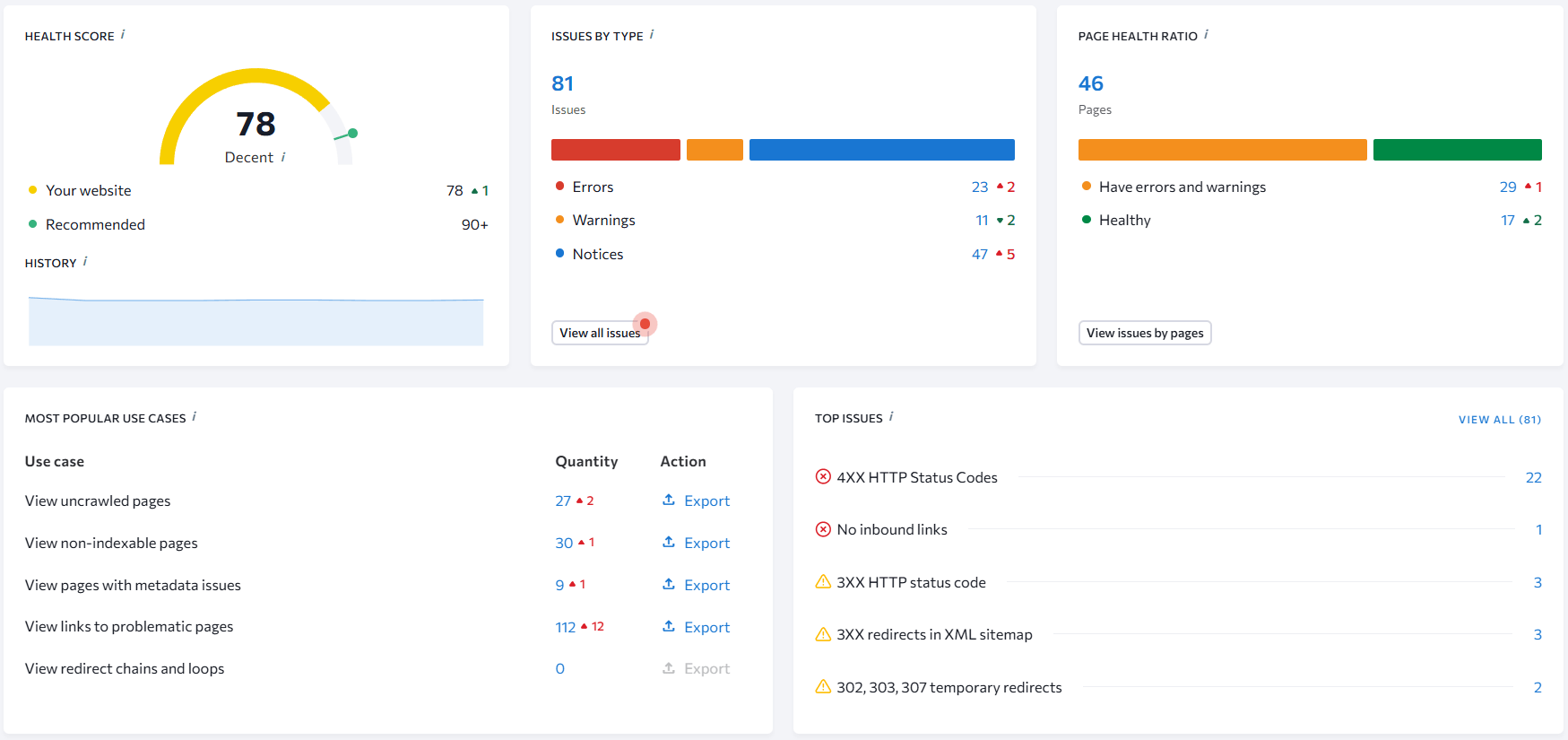
SE Ranking Website Audit Issues List
Surfer SEO’s workflow starts with the page
Surfer SEO is at its best when the question is: “How do we make this page compete?” The Content Editor is positioned as the core environment where you write or optimize while getting real-time guidelines, and Surfer also supports collaboration and sharing drafts—something agencies and distributed teams care about.
Surfer’s documentation also describes a practical workflow for refreshing existing content by taking an “optimize” flow that brings the page into Content Editor for updating—useful for teams that frequently revisit older URLs.
If your site has a strong content engine and you already have a preferred toolkit for tracking and reporting, Surfer SEO can slide in as the specialized layer for on-page execution—especially when your internal process involves briefs, outlines, and updates that you’ve standardized in your publishing workflow.
📷 Image Placeholder 3
What to show: Content Editor with live guideline panel and structure guidance
Click path (inside Surfer SEO): Content Editor → Create → Enter keyword → Create Content Editor
Alt text: “Surfer SEO Content Editor interface with optimization guidelines”
📷 Image Placeholder 4
What to show: Existing-page refresh flow (optimized URL pulled into editor)
Click path (inside Surfer SEO): Content Audit (or Optimize) → Select URL → Optimize → Opens in Content Editor
Alt text: “Surfer SEO workflow for optimizing an existing page in Content Editor”
Which workflow tends to feel easier day-to-day
This is where the choice stops being theoretical.
If you want one place to monitor performance and handle recurring SEO tasks, SE Ranking’s all-around positioning is hard to ignore—its marketing leans into being a broad platform chosen by SEO pros across many countries, and it prominently showcases industry voices and agency operators as endorsements.
If you care most about content execution—making writers faster, outlines clearer, and optimization more consistent—Surfer’s product messaging and documentation focus heavily on the Content Editor experience and collaboration workflows.
Feature Depth and Practical Capabilities in Daily SEO Work
Once workflow design is clear, the next real differentiator between SE Ranking and Surfer SEO is how deep their individual features go when used consistently. This is where many comparisons become misleading, because surface-level feature lists rarely reflect how tools perform after weeks or months of use.
Both platforms offer value, but they do so in very different ways.
Rank Tracking, Visibility, and SERP Monitoring
SE Ranking places rank tracking at the center of its feature set. Keyword positions are tracked across search engines, locations, and devices, with historical data that makes trends easy to spot over time. Instead of treating rankings as a snapshot, the platform emphasizes movement, volatility, and consistency.
This level of visibility is often the reason SE Ranking replaces standalone rank trackers. Many users rely on it as their primary monitoring layer, a point explored further in our in-depth SE Ranking review.
Surfer SEO does not aim to compete here. While it pulls SERP data to power content recommendations, it does not function as a long-term rank tracking solution. Rankings are a reference point rather than a metric you return to daily.
That difference alone can determine which tool feels essential versus optional in a stack.
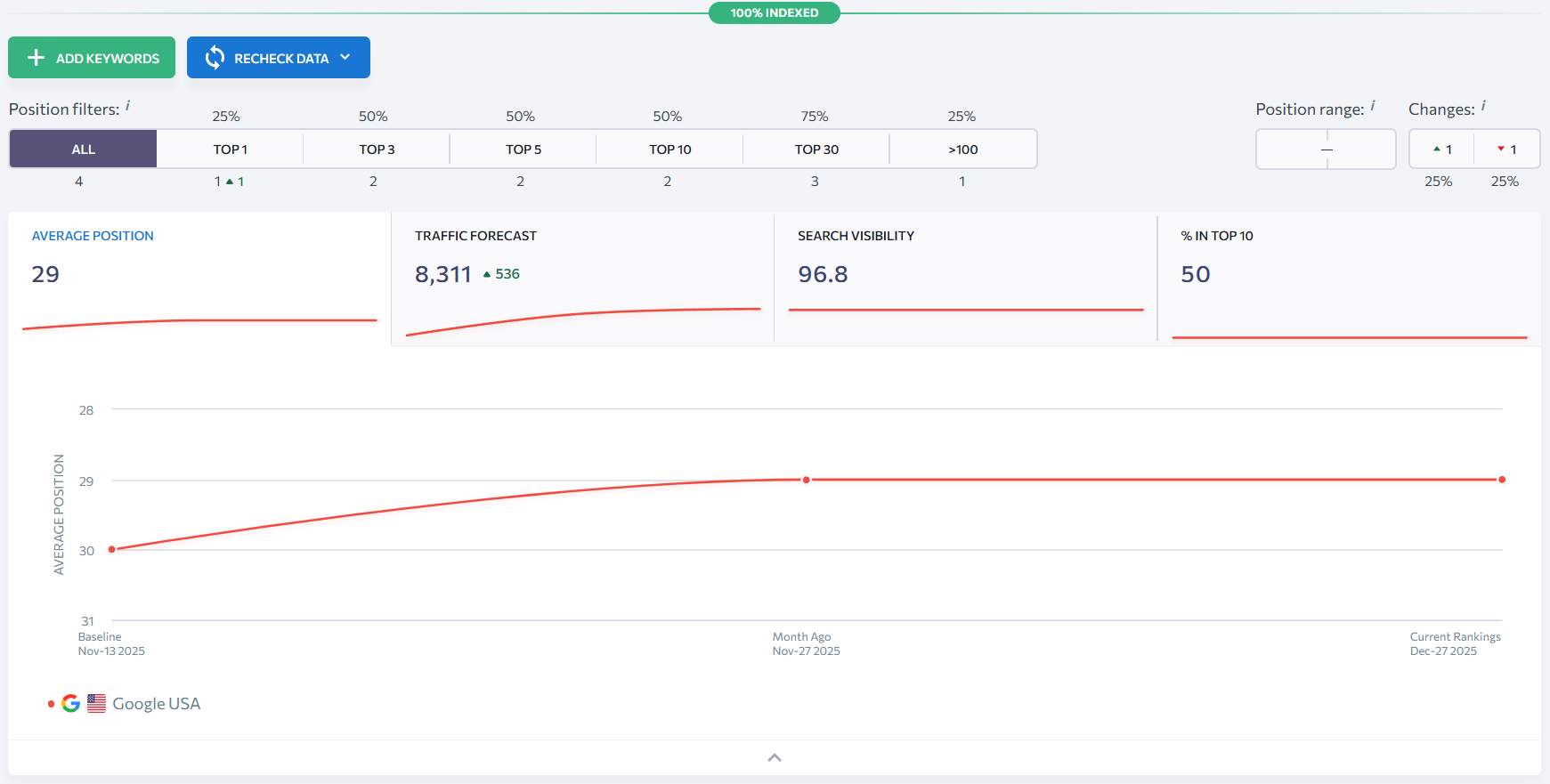
SE Ranking Historical Keyword Ranking Trends
Website Audits and Technical SEO Coverage
Technical SEO is another area where SE Ranking expands well beyond content.
Its Website Audit tool crawls pages, flags issues, and groups them by severity, allowing teams to prioritize fixes logically rather than reactively. This includes indexing problems, metadata inconsistencies, performance issues, and structural warnings.
Because audits are integrated into the same project environment as rankings and competitors, technical work tends to feel less fragmented. Many teams reviewing this capability compare it directly against other all-in-one platforms, often referenced in our comparison of SE Ranking vs Ahrefs.
Surfer SEO does not offer technical auditing. Its focus remains strictly on-page content signals rather than site health. For users who already rely on a separate crawler or audit tool, this may not matter. For others, it introduces an additional dependency.
📷 Image Placeholder
What to show: Technical issues categorized by priority
Click path (inside SE Ranking):
Projects → Select project → Website Audit → Issues by priority
Alt text: “SE Ranking Website Audit technical issue categories”
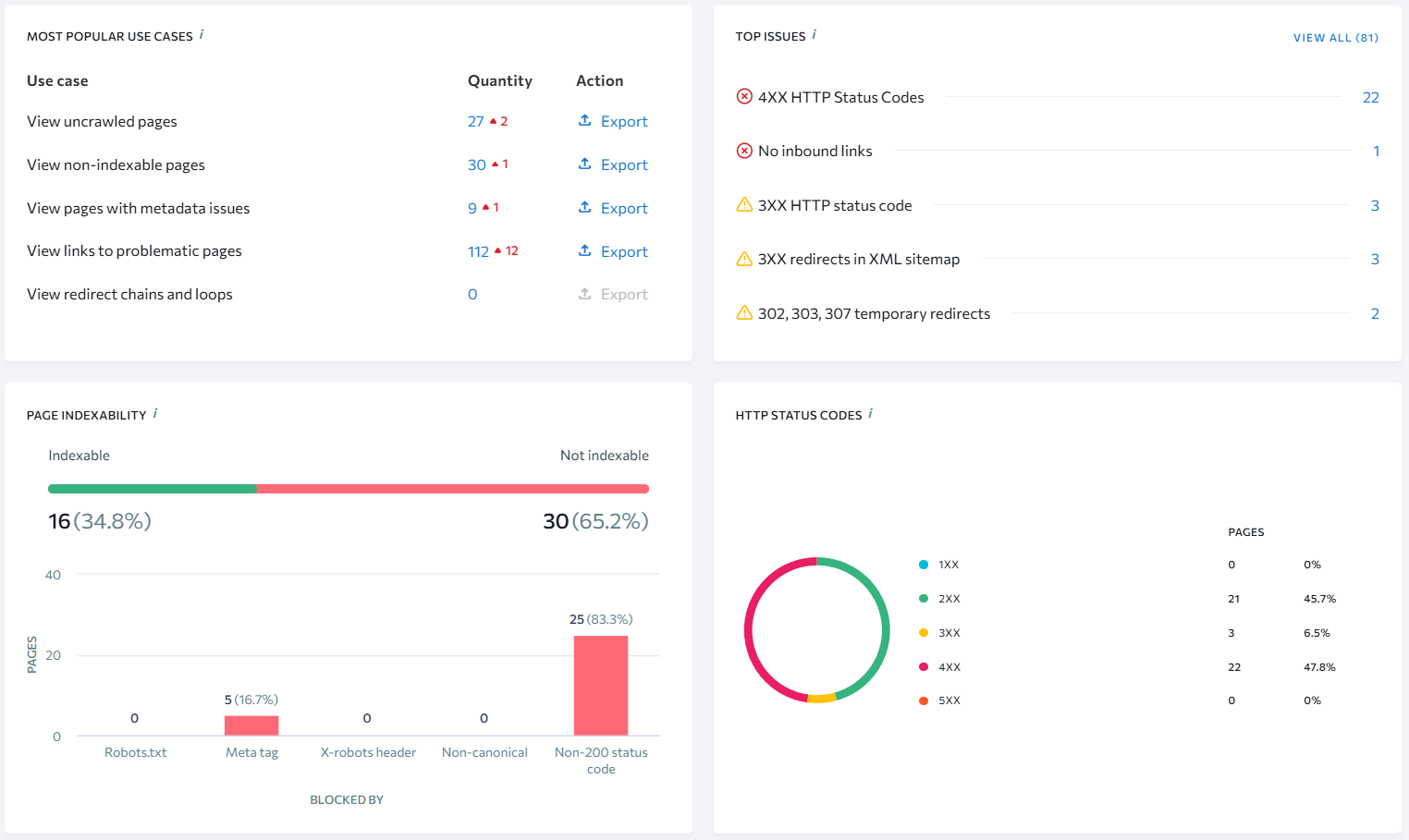
SE Ranking Website Audit Technical Issue Categories
Content Optimization: Depth vs Specialization
This is where Surfer SEO asserts its strongest position.
The Content Editor analyzes top-ranking pages and generates real-time guidance for structure, keyword usage, headings, and semantic coverage. Writers see these recommendations as they work, which reduces guesswork and shortens revision cycles.
For teams heavily invested in content production, Surfer’s specialization is often the deciding factor. Many marketers exploring this capability look first at our full Surfer SEO Review before committing.
SE Ranking also includes content-related tools, but they are positioned as support features rather than the core experience. Content insights exist, yet they don’t replace the granular, live feedback loop that Surfer SEO provides during writing.
This makes Surfer SEO feel indispensable for some workflows and supplementary for others.
📷 Image Placeholder
What to show: Live optimization score and content guidelines
Click path (inside Surfer SEO):
Content Editor → Open existing draft → Optimization panel
Alt text: “Surfer SEO Content Editor live optimization panel”
Competitive Analysis and Market Awareness
SE Ranking offers built-in competitive research tools that allow users to analyze competing domains, keyword overlaps, and visibility shifts. This supports strategic decisions beyond individual pages, especially when entering new topics or markets.
Surfer SEO approaches competition indirectly. Competitor data is used to inform content guidelines, but it is not exposed as a standalone research layer. This works well for page optimization but limits broader market analysis.
Teams evaluating this difference often connect it with decisions outlined in our breakdown of SEO platforms for competitive research, where SE Ranking’s broader scope becomes more relevant.
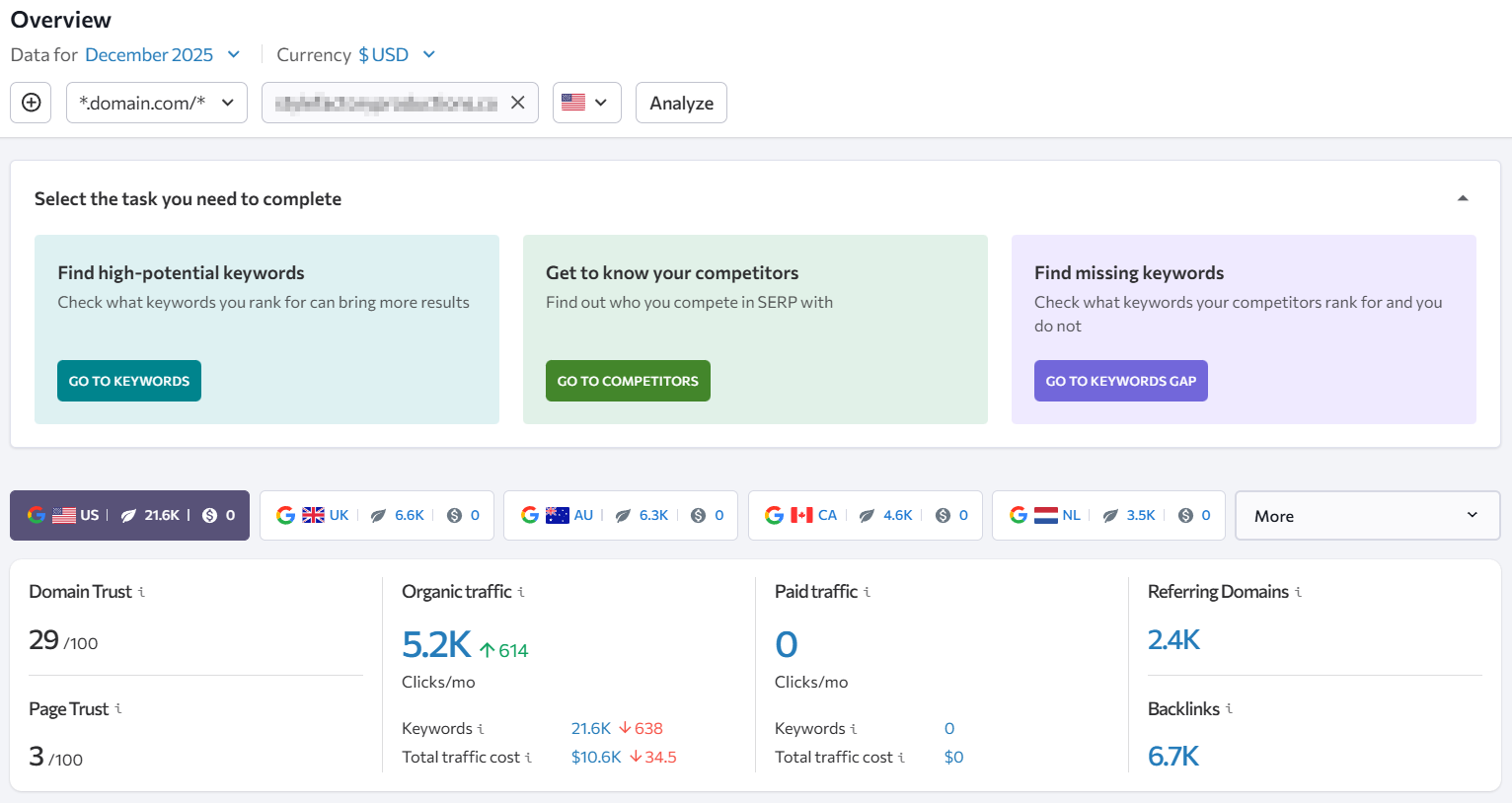
SE Ranking Competitor Keyword Overlap Analysis
Pricing and Pros & Cons
Pricing is one of the areas where the difference between SE Ranking and Surfer SEO becomes impossible to ignore over time. While both tools are positioned as premium SEO solutions, the way costs scale — and the type of work those costs support — follows very different logic.
This distinction matters far more after the first few months of usage than it does on day one.
How Pricing Structure Influences Real Usage
SE Ranking structures pricing around ongoing SEO operations. Plans are influenced primarily by tracked keywords, projects, and data refresh frequency. This aligns closely with how SEO work usually expands: more pages, more keywords, more competitors to monitor.
Surfer SEO, in contrast, ties pricing directly to content activity. The number of Content Editor credits and optimization actions determines how much value a team can extract each month. This model reflects Surfer’s role as a content execution tool rather than a monitoring platform.
That difference shapes budgeting expectations almost immediately.
 SE Ranking — Pricing Table
 SE Ranking — Pricing Table
| Plan | Monthly price | Annual billing (per month equivalent) | Notes |
|---|---|---|---|
| Essential | $65/mo | $52/mo (billed annually) | Main entry plan shown on SE Ranking’s pricing page |
| Pro | $119/mo | $95.20/mo (billed annually) | Mid-tier plan shown on pricing page |
| Business | $199/mo | $159.20/mo (billed annually) | Higher tier shown on pricing page |
Surfer SEO — Pricing Table
| Plan | Monthly price | Annual billing (per month equivalent) | Notes |
|---|---|---|---|
| Essential | $99/mo | $79/mo (billed annually) | Includes Content Editor allocation shown on pricing page |
| Scale | $219/mo | $175/mo (billed annually) | Higher content volume plan |
| Enterprise | — | from $999 (billed annually) | “From $999” listed for Enterprise |
SE Ranking — Pros and Cons
Pros
- All-in-one SEO suite: rankings, audits, keyword/competitor research, backlinks, on-page/SERP tools on core plans.
- Clear plan ladder: Essential → Pro → Business with visible annual savings.
- Transparent limits: projects, seats, tracked keywords clearly defined per plan.
- AI tracking options: AI-related features/add-ons (e.g., AI search/AI results tracking) are explicitly listed.
- Free trial available: No credit card required
- Strong Trustpilot signal: 4.5/5 TrustScore with 665 reviews (at capture time).
Cons
- Overkill for content-only: broad suite may be unnecessary if you only want content optimization.
- Add-ons may be needed: several advanced capabilities are packaged as optional add-ons.
- Scaling hits limits: growth can require upgrades as keywords/projects increase.
Surfer SEO — Pros and Cons
Pros
- Transparent pricing: Essential/Scale pricing shown, plus Enterprise “from” pricing.
- Clear usage limits: Content Editor volumes (e.g., articles/month) are listed per plan.
- Content workflow toolkit: Content Editor, Audit, SERP Analyzer, Topical Map, collaboration options included by tier.
- Automation features: Auto-Optimize and internal linking features are highlighted in plan details.
- AI visibility add-on: AI Tracker is offered as a separate add-on (starting price shown).
- Strong Trustpilot signal: 4.5/5 TrustScore with 221 reviews (at capture time).
Cons
- Scales with output: publishing more content can force upgrades faster due to credit/usage limits.
- Add-ons may be needed: AI Tracker is priced separately.
- Review numbers move: ratings and review counts can change over time (and may display slightly differently depending on where you view them).
User Experience, Learning Curve, and Adoption Friction
How quickly a tool becomes usable often matters more than how powerful it is on paper. In SEO software, friction shows up early—during onboarding, daily navigation, and collaboration—and it usually determines whether a platform sticks long term.
This is another area where SE Ranking and Surfer SEO feel fundamentally different.
First-Time Experience and Interface Clarity
SE Ranking opens with a structured project setup. Users define domains, competitors, keywords, and tracking preferences before diving into reports. That initial setup takes a bit longer, but it pays off once data starts flowing into dashboards that stay consistent over time.
Surfer SEO’s onboarding is pleasantly quick. Most people land in the Content Editor, plug in a keyword, and get moving right away. The whole interface keeps you in “writing mode” — less dashboard hopping, more polishing the page until it’s ready to publish. If you’re curious what else feels similar (or better for your workflow), Best Surfer SEO Alternatives (2025)
📊 UX and Adoption Comparison
| UX Aspect | SE Ranking | Surfer SEO |
|---|---|---|
| Initial setup | More structured | Very quick |
| Interface focus | SEO monitoring & analysis | Content optimization |
| Navigation depth | Multi-layered but consistent | Shallow and task-focused |
| Writer friendliness | Moderate | High |
| Analyst / SEO lead fit | Strong | Limited |
| Learning curve | Gradual | Short |
This contrast explains why the tools feel intuitive to different roles inside the same team.
Daily Usage: Monitoring vs Execution
SE Ranking is the kind of tool you pop open when you want quick clarity: what moved, what broke, and what’s worth tackling next. Rankings and audits act like your early-warning system, and competitor shifts help you decide whether it’s a one-page fix or a bigger strategy moment.
Once that routine clicks, it becomes a comfortable habit—especially when you’re juggling several sites or clients at once. If you’re weighing it against another heavyweight suite, SE Ranking vs Semrush (2025).
Surfer SEO’s daily use is more situational. It’s opened when content is being created or refreshed, then closed once the task is complete. Writers and editors tend to spend concentrated time inside the Content Editor rather than returning daily.
This makes Surfer feel lighter—but also less central—depending on how SEO responsibilities are distributed.
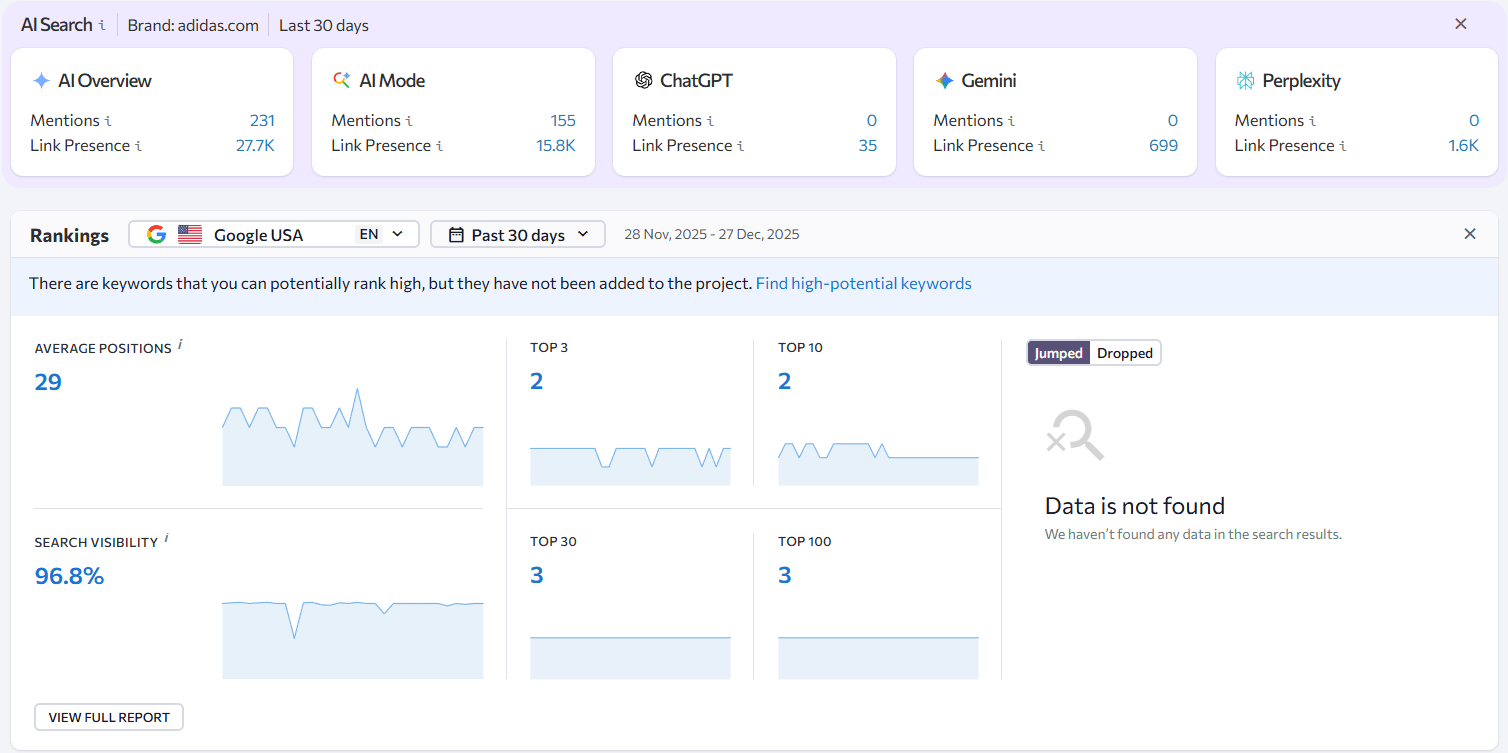
SE Ranking Project Overview Dashboard Interface
📷 Image Placeholder 2
What to show: Surfer SEO Content Editor with score and structure panel
Click path (inside Surfer SEO):
Content Editor → Open draft → Editor view
Alt text: “Surfer SEO Content Editor writing and optimization interface”
Collaboration and Team Adoption
SE Ranking is great when SEO is centralized and the rest of the team needs clean reporting and reliable tracking to act on. If you’re deciding between established “suite” tools, SE Ranking vs Moz (2025).
Surfer SEO shines when writers and editors want fast, practical guidance while they’re actually creating the page. If you’re curious how that compares to a simpler, budget-friendly approach, Surfer SEO vs Ubersuggest (2025).
Neither approach is inherently better—it depends on whether collaboration revolves around data or documents.
Adoption Friction Over Time
Long-term friction usually appears when a tool’s design doesn’t match how a team actually works.
SE Ranking’s friction shows up when teams only need content optimization and feel overwhelmed by broader SEO features.
Surfer SEO’s friction appears when content volume grows and usage limits begin shaping editorial decisions.
Recognizing this early often prevents churnand tool fatigue.